登录配置
console配置
[R1]user-interface console 0       //进入console 0口
[R1-ui-console0]user privilege level 15       # 配置所有用户认证用户界面的用户界面为15,这里可以忽略,不同等级之间的权限不一致。
[R1-ui-console0]authentication-mode password   # 方式 A:使用密码认证,没有用户。
[R1-ui-console0]set authentication password cipher Huawei@123  # 方式A的配置密码,如果使用下面的aaa认证,这里配置的密码在验证时候不再验证。
[R1-ui-console0]authentication-mode aaa      #方式B:AAA 认证(更灵活,可分配不同权限)
telnet配置
[R1]user-interface vty 0 4      //进入vty 0 至 4线 程
[R1-ui-vty0-4]user privilege level 15       # 配置所有用户认证用户界面的用户界面为15,这里可以忽略,不同等级之间的权限不一致。
[R1-ui-vty0-4]authentication-mode password   # 方式 A:使用密码认证,没有用户。
[R1-ui-vty0-4]set authentication password cipher Huawei@123  # 方式A的配置密码,如果使用下面的aaa认证,这里配置的密码在验证时候不再验证。
[R1-ui-vty0-4]authentication-mode aaa      #方式B:AAA 认证(更灵活,可分配不同权限)
总结:进入接口,选择密码的认证模式,选择密码模式就还需要配置密码,选择aaa则还需要配置aaa。权限问题,密码认证则在该视图配置,aaa则另外配置。
AAA配置
[R1]aaa      # 进入AAA接口
[R1-aaa]local-user admin password cipher Huawei@123    # 配置admin用户密码类型为cipher 密码为 Huawei@123
[R1-aaa]local-user admin service-type terminal   # 配置admin用户 允许使用服务的类型
[R1-aaa]local-user admin privilege level 15    # 配置admin用户 权限等级 15级
二层相关
以下配置如下
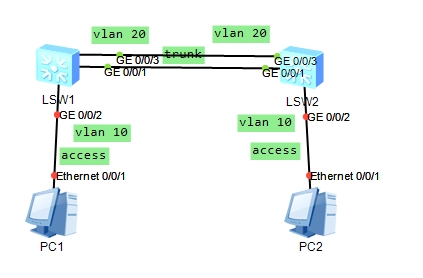
vlan配置,s2交换机同理。
sys
[s1]vlan batch 10 20     # 创建vlan 10 和vlan 20  如果直接:vlan 10 则创建该vlan并进入该接口
[s1]int g 0/0/1    # 进入 GigabitEthernet0/0/1 接口
[s1-GigabitEthernet0/0/1]port link-type trunk   # 设置 端口 类型 为 trunk
[s1-GigabitEthernet0/0/1]port trunk allow-pass vlan 20  # 端口 trunk 放行 vlan 20
[s1-GigabitEthernet0/0/1]quit    # 退出当前的接口视图
[s1]int g 0/0/2   # 进入 GigabitEthernet0/0/2 接口
[s1-GigabitEthernet0/0/2]port link-type access   # 端口 类型 为 access
[s1-GigabitEthernet0/0/2]port default vlan 10   # 端口 默认归属 为 vlan 10
链路聚合
[s1]int Eth-Trunk 0   # 进入聚合端口 0
[s1-Eth-Trunk0] trunkport GigabitEthernet 0/0/1  # 将 g0/0/1 端口加入聚合链路,注意在之前该端口我已经配置了其它,所以这里应该是失败的。
[s1-Eth-Trunk0] trunkport GigabitEthernet 0/0/3  # 将 g0/0/3 端口加入聚合链路
vlan间通信
[s1]int Vlanif 10        # 进入 vlan 10 的接口
[s1-Vlanif10]ip address  192.168.1.2 24   # 配置ip地址 掩码为24位
# 注:之后进入接口、退出接口、进入视图的不再备注甚至不写出,注意查看当前视图
路由配置
静态路由与默认路由
[R1]ip route-static 0.0.0.0 0.0.0.0 192.168.1.1  # 配置默认路由
[R1]ip route-static 192.168.1.0 24 192.168.1.1   # 静态路由,跟默认的区别是静态有区分网段
rip配置
[R1]rip     # 进入rip 进程,如果没有指定则默认是1 ,比如进入2:rip 2
[R1-rip-1]network 192.168.1.0    # 宣告网段
ospf配置
[R1]ospf    # 进入ospf进程,不指定则是1,比如进入2:ospf 2
[R1-ospf-1]area 1	# 进入area 1区域
[R1-ospf-1-area-0.0.0.1]network 192.168.1.0 0.0.0.255   # 宣告网段,注意是反掩码
isis配置
[R1]isis   # 进入isis 进程,不指定则是1,比如进入2:isis 2
[R1-isis-1]network-entity 49.0000.0000.0000.0001.00  # 配置net地址,注意格式问题
[R1-isis-1]is-level level-1  # 配置路由为leve-1
[R1-GigabitEthernet0/0/1]isis enable   # 在g 0/0/1接口中启用isis功能
bgp配置
[R1]bgp 100     # 进入 bgp 100
[R1-bgp]router-id 1.1.1.1  # 配置route-id 名称
[R1-bgp]peer 12.1.1.2 as-number 200	# 配置对等体 12.1.1.2的as号为200
[R1-bgp]network 10.1.1.0 24  # 宣告网段
控制相关
acl配置
[R1]acl 2000  # 进入(创建)acl 2000
[R1-acl-basic-2000]rule deny source 192.168.1.0 0.0.0.255  # 规则 拒绝 来自 192.168.1.0/24 的地址
[R1-GigabitEthernet0/0/1]traffic-filter inbound acl 2000   # 在gig 0/0/1接口入方向使用acl 2000
功能相关
nat配置,方式一:
[R1-GigabitEthernet0/0/1] nat outbound 2000 # 该接口nat出口数据绑定acl 2000,注意acl一般是匹配内网地址的,一个出口接口情况
nat配置,方式二:
[R1]nat address-group 1 11.11.11.2 11.11.11.4   # 方式二:添加nat地址组
[R1-GigabitEthernet0/0/1] nat outbound 2000 address-group 1 # 方式二:该接口nat出口数据绑定nat地址组
[R1-GigabitEthernet0/0/1] nat outbound 2000 # 方式二:该接口nat出口数据绑定acl 2000,该方式是存在多条线路的情况
nat配置,nat映射
[R1-GigabitEthernet0/0/1] nat static global 11.11.11.2 inside 192.168.1.100  # nat 静态 全局 公网地址 流量绑定 该内网地址
[R1-GigabitEthernet0/0/1] nat server protocol tcp global 11.11.11.2 www inside 192.168.1.100 www  # net 服务 端口 全局 公网地址 www服务 绑定该内网地址 www服务(www可可直接填写 80 端口,如果是其它端口就填写其它)
dhcp配置,接口模式配置
[Huawei]dhcp enable     # 先启用全局dhcp
[Huawei]vlan 10   # 创建vlan 10
[Huawei-vlan10]int vlan 10    # 进入 vlan 10
[Huawei-Vlanif10]ip addr 192.168.1.1 24  # 添加ip地址,注意:这里也是dhcp网段分配的范围
[Huawei-Vlanif10]dhcp select interface  # DHCP选择接口模式
[Huawei-Vlanif10]dhcp server  dns-list 223.5.5.5 8.8.8.8  # 配置DHCP分配的dns
# 注意:该交换机的连接PC接口需要添加到vlan 10,自行配置!!!
DHCP配置,全局配置(注:中继方式忽略)
交换机配置默认是清除后的
[S1]dhcp enable     # 先启用全局dhcp
[S1]ip pool vlan10  # 创建ip地址池 名称为vlan10
[S1-ip-pool-vlan10]network 192.168.1.0 mask 24   # 配置网络范围
[S1-ip-pool-vlan10]gateway-list 192.168.1.1     # 配置网关
[S1-ip-pool-vlan10]dns-list 8.8.8.8    # 配置dns
[S1-ip-pool-vlan10]quit
[S1]vlan 10
[S1-vlan10]int vlan 10
[S1-Vlanif10]ip addr 192.168.1.1 24   # 配置网关地址,上面配置的名称仅是名称,这里的IP地址才是关键,注意:跟IP地址池配置的网关对应。
VRRP配置,注意仅提供部分的配置,另外一个主机配置是一样的,只是优先级不一样
[s1]vlan 10
[s1-vlan10]int vlan 10
[s1-Vlanif10]ip address  192.168.1.1 24
[s1-Vlanif10]vrrp vrid 10 virtual-ip 192.168.1.254    # vrrp组10 虚拟网关地址
[s1-Vlanif10]vrrp vrid 10 priority 100    # vrrp组10 优先级
[s1-Vlanif10]vrrp vrid 10 track interface GigabitEthernet 0/0/24 reduced 40  # 追踪 接口 g24端口 如果断开 优先级降低 40
bfd配置
[R1]bfd    # 开启
[R1]bfd 1 bind  peer-ip 23.1.1.3 source-ip 12.1.1.1 auto  # bfd会话1 绑定 匹配 一般这里是R1的地址 ip来自(这里也可以接口) 可达的ip
[R1-bfd-session-1]commit   # 提交配置
# bfd还可以跟vrrp、路由协议、或者端口进行配合配置
镜像端口
[R1]observe-port interface GigabitEthernet 0/0/1   # 配置观察端口
[R1-GigabitEthernet0/0/0]mirror to observe-port inbound  # 将 g 0端口 入方向流量添加到观察端口
ppoe拨号配置
[R1]acl 2000   # 创建acl 2000
[R1-acl-basic-2000]rule permit source 192.168.0.0 0.0.255.255  # 允许 源 192.168.0.0/16 通过
[R1]dialer-rule    # 创建 dialer 列表
[R1-dialer-rule]dialer-rule 1 ip permit  # dialer 列表 1 规则为放行 IP 数据包
[R1]interface Dialer 1
[R1-Dialer1] dialer user admin   # dialer 用户名 admin
[R1-Dialer1] dialer-group 1  # 创建 dialer 组 1
[R1-Dialer1] dialer bundle 1  # 绑定 dialer 组 1 与列表 1
[R1-Dialer1]ppp chap user admin  # 配置 PPP 为 chap 认证,用户名为 admin
[R1-Dialer1]ppp chap password  cipher admin123  # /配置 PPP 的 chap 密码为 admin123
[R1-Dialer1]ip address ppp-negotiate # 配置 IP 地址为自动协商模式
[R1-Dialer1]nat outbound 2000  # 将 ACL 2000 匹配的网段 IP 进行 NAT 转换
[R1-GigabitEthernet0/0/1]pppoe-client dial-bundle-number 1   # 在接口建立 pppoe
IPsec-VPN配置
[R1]acl  number 3000
[R1-acl-adv-3000]rule permit ip source 10.1.0.0 0.0.0.255 destination 10.2.0.0 0
.0.0.255   # 匹配源地址为 10.1.0.0/24,目的地址为 10.2.0.0/24网段的 IP
[R1]ipsec proposal test    # psec 提议名称 为test
[R1-ipsec-proposal-test]esp authentication-algorithm sha2-256  # 配置 esp 封装加密算法
[R1-ipsec-proposal-test]esp encryption-algorithm aes-128  # 配置 esp 封装验证算法
[R1-ipsec-proposal-test]quit
[R1]ike local-name test_ike  # 配置 IKE 协商时的名称
[R1]ike proposal 1  # 配置 IKE 安全提议编号为 1
[R1-ike-proposal-1]encryption-algorithm aes-cbc-128   #配置 IKE 加密算法为 aes-cbc-128
[R1-ike-proposal-1]authentication-algorithm sha1  # 配置 IKE 认证算法为 sha1
[R1]ike peer test_ik v2   # IKE 对等体名字为 test_ik ,v2版本
[R1-ike-peer-test_ik]ike-proposal 1  # 引用 IKE 安全提议编号为 1
[R1-ike-peer-test_ik]pre-shared-key cipher huawei123  # 共享密钥为 huawei123
[R1-ike-peer-test_ik]local-id-type name    # 选择名称作为本地标识符
[R1-ike-peer-test_ik]remote-address 1.2.0.2   # 指定对端的 IP 地址为 1.2.0.2
[R1-ike-peer-test_ik]remote-name ike2  # 配置对端的设备名称
[R1-ike-peer-test_ik]nat traversal  # 配置 NAT 穿透
[R1-ike-peer-test_ik]quit
[R1]ipsec policy policy1 1 isakmp   # 配置 IKE 动态协商方式安全策略
[R1-ipsec-policy-isakmp-policy1-1]security acl 3000   # 引用 ACL 来根据地址网段来加密
[R1-ipsec-policy-isakmp-policy1-1]ike-peer test_ik    # 引用定义的 IKE 对等体
[R1-ipsec-policy-isakmp-policy1-1]proposal test    # 引用定义的 IPsec 安全提议
[R1-ipsec-policy-isakmp-policy1-1]inter gig 0/0/0
[R1-GigabitEthernet0/0/0]ipsec policy policy1    # 在接口上引用安全策略组
MPLS配置,仅表述
1.配置lsr-id:mpls lsr-id 1.1.1.1    # 配置id为1.1.1.1,不能相同
2.开启全局mpls:mpls
3.进入接口开启mpls:mpls     # 全局和接口都要开启
# 上述全部配置一致,配置lsr-id和开启mpls,下面是看设备的位置进行配置
4.配置起始到终点:static-lsp ingress 2_to_4 destination 192.168.45.0 24 nexthop 192.168.23.2 out-label 100         # 这里是开始的,mpls方式:in是入口、eg是出口、tr是运输.同时要注意标签要对应,a出口标签为100,b连接a的接口进入的标签也要100。
4.配置中间:static-lsp transit 3_to_4  incoming-interface GigabitEthernet0/0/0 in-label 100 outgoing-interface GigabitEthernet0/0/1 nexthop 192.168.34.2 out-label 200   # 这里是中间的,接口和标签要对应上
4.配置结束:static-lsp egress R4_END incoming-interface GigabitEthernet0/0/0 in-label 200  # 这里是结束。
无线配置
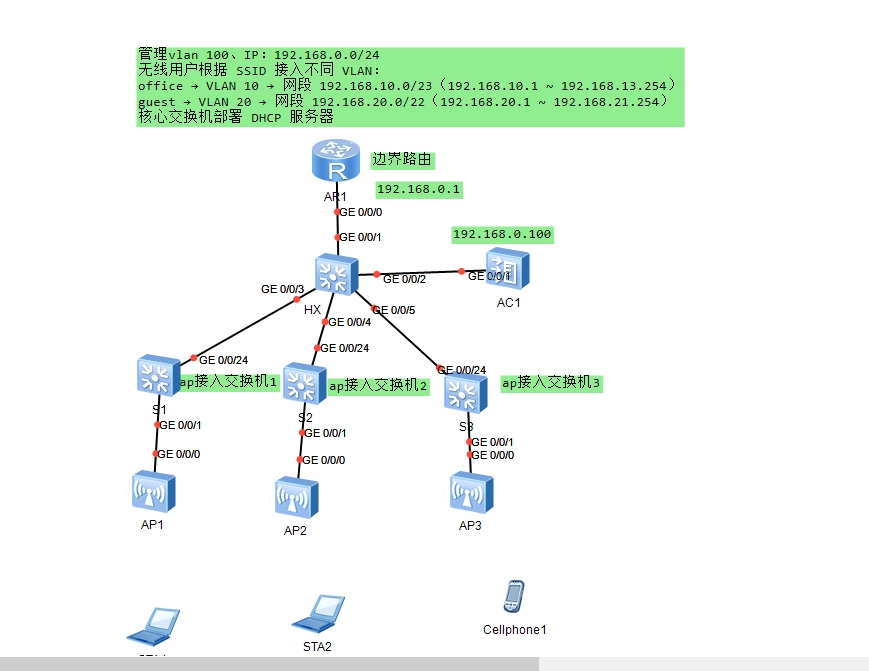
核心交换机配置:sys [Huawei]sys HX [HX]un in en [HX]dhcp enable # 全局启用 DHCP 服务 [HX]ip pool vlan10 [HX-ip-pool-vlan10]gateway-list 192.168.10.1 # 设置 VLAN 10 的默认网关(即 Vlanif10 的 IP) [HX-ip-pool-vlan10]network 192.168.10.0 mask 23 # 定义地址池范围:192.168.10.0/23 → 可用 IP:510 个(满足 office 需求) [HX-ip-pool-vlan10]dns-list 8.8.8.8 114.114.114.114 # 为客户端分配 DNS 服务器 [HX-ip-pool-vlan10] quit [HX]ip pool vlan20 [HX-ip-pool-vlan20]network 192.168.20.0 mask 22 # VLAN 20 地址池:192.168.20.0/22 → 可用 IP:1022 个(满足 guest 需求) [HX-ip-pool-vlan20]gateway-list 192.168.20.1 # 网关 [HX-ip-pool-vlan20]dns-list 8.8.8.8 114.114.114.114 [HX-ip-pool-vlan20]quit [HX]ip pool ap [HX-ip-pool-ap]network 192.168.0.0 mask 24 [HX-ip-pool-ap]gateway-list 192.168.0.1 [HX-ip-pool-ap]dns-list 8.8.8.8 114.114.114.114 [HX-ip-pool-ap]quit [HX]vlan batch 10 20 100 # 一次性创建三个 VLAN:VLAN 10:办公用户、VLAN 20:访客用户、VLAN 100:AP 管理 [HX]int vlan 10 [HX-Vlanif10]ip addr 192.168.10.1 23 [HX-Vlanif10]dhcp select global # 启用全局 DHCP,表示该 VLAN 使用 ip pool vlan10 分配地址,注意,在设置dhpc池时配置的网关地址一定要存在该接口的地址 [HX-Vlanif10]int vlan20 [HX-Vlanif20]ip address 192.168.20.1 22 [HX-Vlanif20]dhcp select global [HX-Vlanif20]int vlan100 [HX-Vlanif100]ip addr 192.168.0.1 24 [HX-Vlanif100]dhcp select global [HX-Vlanif100]quit [HX]int g 0/0/1 # 进入端口 [HX-GigabitEthernet0/0/1]port link-type access # 修改端口为access模式,由于上层时路由器,只需要将vlan100的标签转发出去即可 [HX-GigabitEthernet0/0/1]port default vlan 100 # 允许vlan 100 [HX-GigabitEthernet0/0/1]int gig 0/0/2 [HX-GigabitEthernet0/0/2]port link-type tr [HX-GigabitEthernet0/0/2]port trunk allow-pass vlan 10 20 100 [HX-GigabitEthernet0/0/2]int gig 0/0/3 [HX-GigabitEthernet0/0/3]port link-type tr [HX-GigabitEthernet0/0/3]port trunk allow-pass vlan 100 10 20 [HX-GigabitEthernet0/0/3]int gig 0/0/4 [HX-GigabitEthernet0/0/4]port link-type tr [HX-GigabitEthernet0/0/4]port trunk allow-pass vlan 10 20 100 [HX-GigabitEthernet0/0/4]int gig 0/0/5 [HX-GigabitEthernet0/0/5]port link-type tr [HX-GigabitEthernet0/0/5]port trunk allow-pass vlan 10 20 100 [HX-GigabitEthernet0/0/5] quit 各个接入交换机配置如下: sys [Huawei]un in en [Huawei]vlan 100 [[Huawei]-vlan100]quit [[Huawei]]int g 0/0/24 [[Huawei]-GigabitEthernet0/0/24]port link-type tr [[Huawei]-GigabitEthernet0/0/24]port trunk allow-pass vlan 100 [[Huawei]-GigabitEthernet0/0/24] int gig 0/0/1 [[Huawei]-GigabitEthernet0/0/1]port link-type tr [[Huawei]-GigabitEthernet0/0/1]port trunk allow-pass vlan 100 [[Huawei]-GigabitEthernet0/0/1]port trunk pvid vlan 100 # 连接ap的端口需要打上标签,否在无法建立 CAPWAP 隧道 [[Huawei]-GigabitEthernet0/0/1] quit 注:1.为什么只在 接入交换机 上创建VLAN100,不创建其它VLAN 呢? 因为是用来隧道转发,数据到达AC1后才会打上不同的VLAN的标签然后发给核心。 2.为什么连接AP的接口要打port trunk pvid vlan 100? 因为交换机收到AP的数据帧打上100标签发送,把打上100标签的数据帧去掉然后发给AP。 3.为什么核心到接入交换机再到ap这过程,仅放行vlan 100? 因为在ac中配置了vlan是管理ap,终端连接ap,ap通过隧道将数据发给ac,ap转发给核心,再由核心进行下一步的转发。 4.转发本质:STA → AP → CAPWAP 隧道 → AC → 核心交换机 → 路由器 → 外网 AC配置如下: sys [AC]un in en [AC]vlan batch 10 100 20 [AC]int gig 0/0/1 [AC-GigabitEthernet0/0/1]port link-t trunk [AC-GigabitEthernet0/0/1]port tr a vlan 10 100 20 [AC]int vlan100 [AC-Vlanif100]ip add 192.168.0.100 24 # 设置 AC 的管理 IP,用于 CAPWAP 隧道建立 [AC-Vlanif100]quit [AC]capwap source interface vlanif100 # 设置 CAPWAP 源接口,AP 会向此 IP 发起隧道连接 [AC]wlan [AC-wlan-view]ap auth-mode no-auth # 免认证自动上线 ,可以设置sn或者mac等方式,如果设置了mac需要自行添加 [AC-wlan-view]security-profile name office-security # 设置 office-security 安全模板 [AC-wlan-sec-prof-office-security]security wpa2 psk pass-phrase admin123 aes # 设置认证方式和密码为admin123 [AC-wlan-sec-prof-office-security]quit [AC-wlan-view]security-profile name guest-security [AC-wlan-sec-prof-guest-security]security wpa2 psk pass-phrase admin456 aes [AC-wlan-sec-prof-guest-security]quit [AC-wlan-view]ssid-profile name office-ssid # SSID 模板 [AC-wlan-ssid-prof-office-ssid]ssid office # wifi 名称 [AC-wlan-ssid-prof-office-ssid]ssid-profile name guest-ssid [AC-wlan-ssid-prof-guest-ssid]ssid guest [AC-wlan-ssid-prof-guest-ssid]quit [AC-wlan-view]vap-profile name office-vap # 配置office vap模板 [AC-wlan-vap-prof-office-vap]forward-mode tunnel # 隧道转发模式:用户数据回传 AC 集中转发 [AC-wlan-vap-prof-office-vap]service-vlan vlan-id 10 # 业务 VLAN 为 10,客户端获取 192.168.10.x 地址 [AC-wlan-vap-prof-office-vap]security-profile office-security # 配置安全模板为 office-security [AC-wlan-vap-prof-office-vap]ssid-profile office-ssid # 配置ssid模板为 office-ssid [AC-wlan-vap-prof-office-vap] quit [AC-wlan-view]vap-profile name guest-vap # 配置guest vap模板 [AC-wlan-vap-prof-guest-vap]forward-mode tunnel [AC-wlan-vap-prof-guestvap]service-vlan vlan-id 20 [AC-wlan-vap-prof-guestvap]security-profile guest-security [AC-wlan-vap-prof-guestvap]ssid-profile guest-ssid [AC-wlan-vap-prof-guestvap]quit [AC-wlan-view]ap-group name default # 默认 AP 组绑定 VAP [AC-wlan-ap-group-default]vap-profile office-vap wlan 1 radio all # wlan 1 → 2.4GHz 和 5GHz 都广播 office [AC-wlan-ap-group-default]vap-profile guest-vap wlan 2 radio all [AC-wlan-ap-group-default]quit [AC-wlan-view]quit #ap无需任何配置
防火墙配置,防火墙使用的是usg6000v,默认是不存在的,需要自己下载额外镜像。
下载链接: 相关配件
防火墙默认账号和密码为:admin和Admin@123
第一次登录会要求修改密码,先输入旧密码也就是 Admin@123 后再输入两次新密码,注意密码复杂程度要有英文大小写数字符号,四种类型。
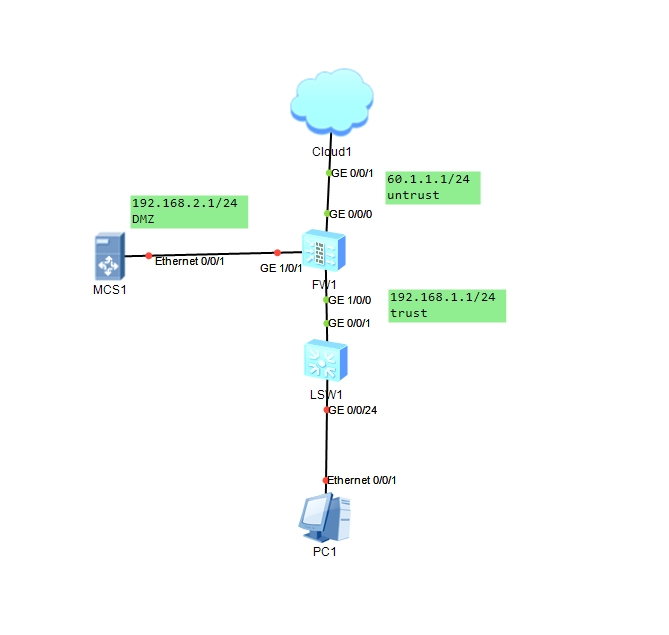
[USG6000V1]firewall zone trust   # 进入 防火墙  trust 区域
[USG6000V1-zone-trust]add interface GigabitEthernet  1/0/0   # 添加端口 g1 到该区域
[USG6000V1-zone-trust]quit
[USG6000V1]fir zone untrust   # 进入 防火墙  untrust   区域
[USG6000V1-zone-untrust]add interface GigabitEthernet 0/0/0    # 添加端口 g0 到该区域,默认情况下这个接口的就是这个untrust 不用添加,这里仅多做几点进行理解参考
[USG6000V1-zone-untrust]quit
[USG6000V1]firewall zone dmz  # 进入 防火墙  dmz 区域
[USG6000V1-zone-dmz]add interface GigabitEthernet 1/0/1   # 添加端口 g1 到dmz区域
[USG6000V1-zone-dmz]quit
[USG6000V1]sys FW
[FW]security-policy    # 进入安全策略
[FW-policy-security]rule name test    # 设置 安全策略 名称为 test
[FW-policy-security-rule-test]source-address 192.168.1.0 mask 255.255.255.0     # 源地址为 192.168.1.0/24
[FW-policy-security-rule-test]source-zone trust    # 源区域为 trust 区域
[FW-policy-security-rule-test]destination-zone untrust  # 目的区域为 untrust 区域
[FW-policy-security-rule-test]action permit   # 执行行为为允许
[FW-policy-security-rule-test]quit
[FW-policy-security]quit
[FW]nat-policy   # 进入NAT 策略
[FW-policy-nat]rule name  test   # 设置 nat策略 名称为 test
[FW-policy-nat-rule-test]source-address 192.168.1.0 mask 255.255.255.0 # 源地址为 192.168.1.0/24
[FW-policy-nat-rule-test]source-zone trust  # 源区域为 trust 区域
[FW-policy-nat-rule-test]egress-interface GigabitEthernet 0/0/0   # 出接口为 0
[FW-policy-nat-rule-test]action source-nat easy-i  # 执行基于 east-ip 的 NAT

# ...其它同理


